Admit Attendees for {{ event.title }}
Attendee Check-In
This event has more than one performance active at this time. To check in for one specific performance, select it from
the list. To scan tickets for ALL active performances, select ** Any **.
Loading...
{{ chkinTot.name }}
{{ chkinTot.numHeld }} / {{ chkinTot.numSold }}
No check-ins found for this performance.
What's That?
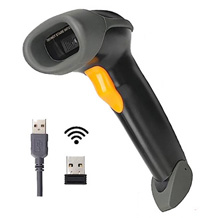
| Rather than using the camera on a mobile phone or tablet, use a commercially available barcode scanner gun. Based on the one you select, you'll either connect it with a USB cable, or access it via Wi-Fi or Bluetooth. Check the manual for your device if you're not sure. Using a scanner gun allows you to run the Scan App on a laptop or Chromebook. |
|
No camera was detected. Please check settings to allow access to camera.
Longer intervals are suitable for external power, not battery.
{{ batteryPercent }}%
Battery Alert Options
Send a notification when battery level gets low
If camera does not activate when you click START SCANNING please check device Settings
to make sure this browser
may access the camera.
Use a wired or wireless scanner gun to read QR codes.
You won't need a mobile device camera in this case.
Tickets Preload is enabled. Data for {{ numAdmissionTickets }} tickets
is stored locally in case of Internet connection issues.
No Internet Connection or Server Error
You may keep scanning tickets. We'll help you synchronize everything later when you're connected again.
If you keep working, do not close this browser or page until you're connected again and your
changes are synchronized, or you will lose all your data.
There are {{ offlineActivity.length }} updates waiting to be synchronized.
Scanned={{ qrCounts.scanned }}
Error={{ qrCounts.error }}
Idle={{ qrCounts.idle }}
Error={{ qrCounts.error }}
Idle={{ qrCounts.idle }}
- {{ $filters.toDate(item.tsp,'hh:mm:ss') }}: {{ item.type }} {{ item.message }}
Loading...
Loading...
Offline Mode
Don't close this app until you're reconnected and have
synchronized your changes.
{{ fm.msg }}
{{ fm.info }}
Attendee
Responses
- {{ ans.checkinLabel ? ans.checkinLabel : ans.question }} : {{ ans.response }} (No Response Given) Default={{ ans.defaultAnswer }}
{{ batteryPercent }}%